
Templates Addin
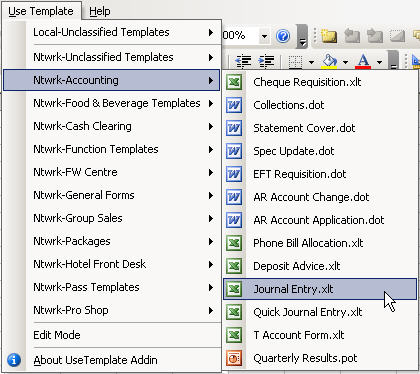
This addin was created to increase the functionality of Excel, and make it easier to use templates in the MS Office system. I use a lot of templates, and got tired of having to make up to six clicks to open one. Now, I have a menu that holds all of my MS Office templates (not just Excel), only three clicks away.
Features:
- Adds a menu to hold all Excel, Word and Powerpoint templates.
- Open any MS Office template right from Excel. (No more guessing what application you built it in!)
- Adds a separate submenu for each folder in your templates directory to keep them organized.
- Groups all templates in your root templates directory in one folder.
- Supports both network and local templates.
- Allows you to change your template directory from Excel. (Previously only available through Word.)
- Toggle button to switch between Edit and Normal modes. (Edit mode opens template for editing, normal creates a new document based on the template.)
Versions Supported:
Excel 97, 2000, 2002(XP) and 2003.
Screen Shot:
Download:
The download package includes the latest version of the UseTemplate add-in, as well as three (very bare bones) sample templates so that you can test the application.
The current release, (v1.007 from May 3, 2007,) can be downloaded by clicking the button below:

Instructions:
For a complete set of instructions on how to install and use this add-in, please visit the UseTemplate Add-in Instruction page.
Acknowledgements:
I'd like to thank Bob Phillips of www.xldynamic.com for helping me make this file compatible with Excel 97.
Also, I'd like to thank my beta testers for putting this through some paces for me. They are:
- Zack Barresse
- Steve Lucas
- Matt Vidas