
During my course of experimenting with PDFCreator, I ran into a few interesting things. In an effort to help any of you who decide to adapt this to your own use, I thought I'd share those here.
Getting the right download package
All of the code samples provided on the site were tested successfully using PDFCreator 0.9.1, GPLGhostscript.exe download package. Excel versions tested include:
- Excel 2003
- Excel 2007
I did, however, encounter some issues when testing using the AFPL version of the download package. Specifically, setting the encryption to 128 bit created a file that was corrupted. Personally, I'd just avoid that version, and stick with the GPL version.
What Sticks?
Settings set at run time via your VBA routine are NOT persistent. This is good news, as it means that what you do in code won't mess up your installation.
By contrast, with the exception of all passwords (so far as I've seen so far,) all changes made in the actual PDFCreator configuration manually ARE persistent. So if you change your current job to 128 bit encryption and set it to prevent printing, expect all of your jobs to generate in the same fashion until you change it.
Fortunately, there is a method to save settings via code, and it is now illustrated in the Resetting PDF Creator Options via Code article.
When your settings get scrambled...
During my creation and testing of some of the PDFCreator procedures, I did manage to actually change a setting in PDFCreator that remained persistent. This particular setting was related to the "Print to default directory", and once set never prompted me with the PDFCreator prompt again when manually submitting jobs. I hadn't yet figured out the code route to reset the interface, so had to do some sleuthing around for a while to rescue myself. Eventually I remembered seeing PDFCreator on my start menu at: StartAll ProgramsPDFCreatorPDFCreator. When you open it, you should see a screen that looks like this:
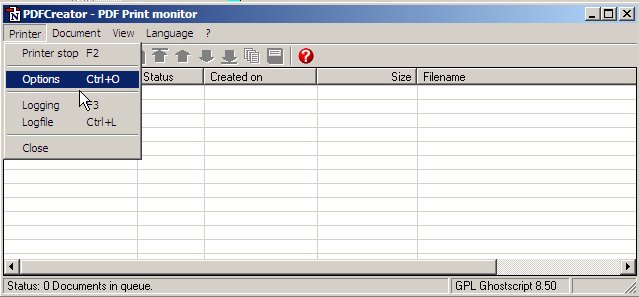
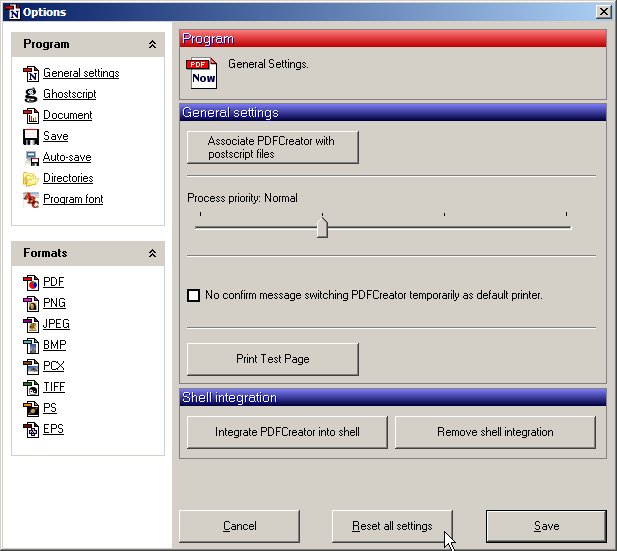
If things go horribly awry, and you lose the ability to choose options when printing to PDFCreator, just go to the above, click on PrinterSettings, and click the big "Reset all Settings" button (shown below). That will restore you to the defaults, and you'll be good to start playing around again.
Don't fall for the intellisense
As far as actual coding goes, I did find one thing rather strange. The use of Intellisense* is somewhat limited with PDFCreator. You can use it to create a routine, but it won't run. For example, I would code:
.cOptions.UseAutosave = 1
Unfortunately, despite the fact that all of the properties and methods are listed in the Object Browser, this would not run. Compiles just fine, but has no effect in changing any of the settings for some reason. By contrast, the following works like a charm:
.cOption("UseAutosave") = 1
If anyone knows why, please post a comment and let me know.
*Intellisense is the feature turned on when you check the "Auto List Members" flag in the VBE options. It is the setting that automatically pops up all the valid properties and methods that are applicable to the item when you press the "." key
Setting security
If you are trying to set security features in your documents, you MUST set the PDFUseSecurity and PDFOwnerPass properties to 1, and also provide a PDFOwnerPasswordString. If you do not do this, your attempts at security will be ignored. See Using PDF Creator with security options set for an example.
Error messages
It is not uncommon to see an error with the message "Can't initialize PDFCreator." when looping PDFCreator code, or when trying to run PDFCreator routines for a second time. If you do suffer this issue, check the page on Error Messages: Can't Initialize PDFCreator for solutions.